
H5P Group just released version 1.17.4 of their WordPress plugin. That update brings theming capabilities to the core of H5P and to the latest versions of quite a number of content types. The remaining content types are supposed to get theming support in the near future.
So, what does that mean on WordPress? If you know how custom CSS properties work, if you know what properties there are for H5P now, and if you know how you can add your own CSS declarations to H5P contents, then yes. But that’s the “if”s. And it sounds daunting.
Hmm, but H5P.com has this shiny theme picker. Isn’t that available for the WordPress plugin, too? Nope. It is baked into H5P.com. I don’t think that such a feature which requires a low effort to be built is suitable for a paid premium of open source software though. It is very likely that someone in the community will copy the idea quickly and make it available in order to fill the gap. And that just happened.
H5P Theme Picker
I already knew how theming works in H5P in general, but the theme picker on H5P.com allows to create custom themes and computes the 34 color variables in total from only 4 values that you set. Well, there’s documentation on these colors. Unfortunately, that documentation is incomplete and partially wrong, so I invested some time to reverse-engineer how the colors are computed. I shared my findingts with H5P Group, so they will hopefully update their documentation soon.
With that fresh knowledge, I built a so called “web component” from scratch. It’s essentially a custom HTML tag that you create and others can use easily to add my theme picker to an HTML page – or any other H5P integration ranging from Moodle’s own integration, Lumi, the plugin for ILIAS, … To fellow developers: I did not make use of the shadow dom functionality even though it would make a lot of sense, because it breaks CSS anchor positioning. When I find some time to create a workaround …
If you want to reuse the H5P theme picker in your own project: Find it on npmjs.org.
If you prefer to build something like it from scratch and need some inspiration, then feel free to use the source code.
H5P Themer
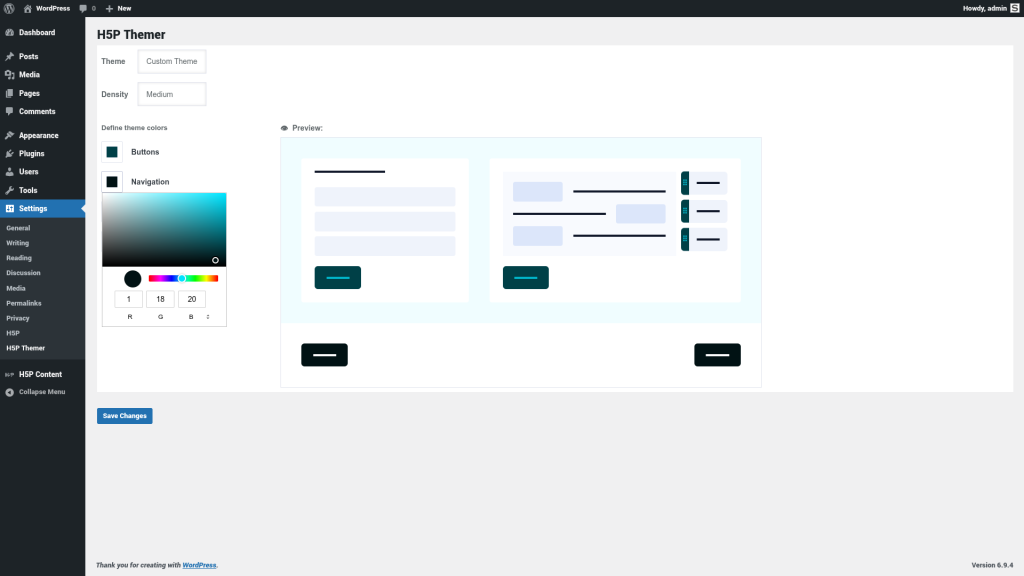
Now, that theme picker alone does not give it to you in WordPress. That’s what I wrote a tiny plugin for that mimicks what you can do on H5P.com: Pick a “theme” and set the “density” to be applied to all contents on your site.
You can find the H5P Themer plugin in the WordPress plugin repository. Just install and activate it like any other WordPress plugin.
If you want to build a clone of that plugin for another H5P enabled platform, e. g. Moodle or Drupal, then please check out the source code.
Ultimately, I hope that this plugin won’t be necessary to have at all. Ideally, H5P Group would just follow the same approach and add a theme picker to all their H5P integrations.
Thanks to Gio Fonseca for beta-testing!
That’s not everything 🙂
Mimicking what H5P.com does was the straightforward approach. You may wish for other things, however. For instance, maybe these are your user stories:
- As an admin, I want to be able to define a set of theme presets that content creators can choose from.
- As a content creator, I want to be able to pick a theme for my H5P content from a list of “allowed” themes that an admin prepared for me.
- …
I kept those in mind when building the theme picker component. It comes with the same set of predefined themes that H5P.com offers, but it’s already prepared to show your own set of themes instead, to not offer to create a custom theme, to not offer the density setting, etc. It’s really just a picker that gives you the computed values. What you do with these, is up to you and your integration.
So, if you want to create an “H5P Themer” for Moodle, ILIAS, Edlib, Stud.IP, Lumi, … that can even do more: Just peek at the code of the H5P Themer for WordPress and see how simple it is to do when you use the theme picker web component that does the heavy lifting.
Future plans?
Not really. Maybe I’ll add a text field that accepts custom CSS, so you can style H5P contents beyond the theming options easily. But if you need more: You know, I earn my living with IT freelancing as SNORDIAN …
Your Plugin but even more your whole work for H5P is amazing and I hope the H5P-Core Team will see this too.
Thanks a lot, Oliver.
Thanks, Christian!
Thanks for yet another very useful plugin, Oliver !
You’re welcome! The essence is the theme picker web component, the plugin is not doing much.
Hi Oliver,
I’m currently testing out your new H5P Themer plugin on a local WordPress environment (v6.9.4), but I’ve run into a bit of a snag.
After installing and activating the plugin, I navigated to the H5P Themer settings page under the “Settings” menu, but the interface appears to be empty. While the page header “H5P Themer” and the “Save Changes” button are visible, the theme picker component itself isn’t rendering.
I know you mentioned this uses a web component—could there be a specific dependency or a script loading issue common in local environments (like Local WP) that might cause this?
Best regards,
Sam
Hi Sam!
I have not encountered this before, nor has Giovanni who tested the plugin. Could be a conflict with another plugin, potentially. Could you please send me some more details (see https://snordian.de/2024/02/17/how-can-i-craft-an-effective-bug-report-for-h5p-components/)?
As step 1, I’d particularly be interested in the browser (+version) that you are using and any error message that you may see in your browser’s development console. Anything suspicious in your PHP error log might help as well, but let’s assume it’s a client-side issue.
Cheers,
Oliver
Hi Oliver, I found the culprit in the console! It’s throwing:
Uncaught TypeError: crypto.randomUUID is not a function.
It looks like the web component is calling crypto.randomUUID(), which is being blocked because my local dev environment is running on standard HTTP. Since crypto requires a Secure Context (HTTPS), the script crashes.
Just wanted to let you know in case you want to implement a fallback for users on local/non-SSL dev sites!
I have not had any issues on my local, non-SSL site. But thanks a lot! Easy fix. I just need clean IDs, and using randomUUID is convenient, but can be replaced easily.
Updated – and now available in the WordPress plugin repository, too (so you should find the update in your WordPress dashboard anyway). Thanks!
Thanks, Oliver!
I’ve now installed the update directly from the WordPress repository and sorted out the SSL certificate issue on my local environment. Everything is working perfectly now. I really appreciate the quick fix!
Don’t mention it. I don’t like bugs lurking around, so I gladly fix them quickly.
By the way, Oliver—I really enjoy your work for the H5P community. If you ever need more beta testers for future projects or plugin updates, I’d be glad to help out!
Sam, thanks for the offer! I am a little reluctant though, because even though most of what I do ends up in the open source world, I get paid to create those things. It feels somewhat wrong to let the community test things that I get paid for to build.
I do not have these reservations for my spare time projects like this plugin though.
That makes total sense, Oliver! I completely respect that distinction between your professional freelance work and your community projects. Consider the offer open for any of your “spare time” experiments like this one—I’m happy to help out whenever it’s helpful to you!